- 19education authorities, with their regulations
- 3,000+subjects and areas with their criteria
- 66VET qualifications with their learning outcomes
- 7languages in the app
Criteria-based assessment shouldn't eat your evenings
LOMLOE asks you to assess criterion by criterion. In a spreadsheet that means formulas, copying and pasting the decree and checking nothing breaks. Evalúat does it for you.
- BeforeCopying criteria from the decreeWith EvalúatPick your region, year and subject: the criteria are already there, each with the regulation it comes from.
- BeforeFormulas that breakWith EvalúatDrag to set the weights and every criterion, competence and subject grade is calculated for you, by term or for the year.
- BeforeNot knowing how much you've assessedWith EvalúatYou always see how much of the weight you've graded, and only what you've assessed counts.
How it works, in three steps
Create your class
Region, year and subject or module. Paste the list of students or copy it from another class in the same group.
Enter grades
For each assessment tool (exam, activities, rubric, class diary) you grade the criteria it covers.
Evalúat does the maths
Grades for every criterion, competence and subject, risk alerts, charts and Excel and PDF reports.
Your students' names never leave your device
Evalúat encrypts names on your computer or phone, with a key only you hold, before anything is saved. The server only ever receives unreadable text: neither Evalúat nor anyone who accesses it can tell whose grades they are.
- No need to enter phone numbers, addresses or dates of birth.
- In assessment meetings each teacher shares only their subject averages, and names travel encrypted.
- Show initials only on screen, in case you project in class.
Everything it does for you
Team assessment meetings
Invite the group's teachers with a link or a QR code: you'll all see the averages for every subject, how they change, and a board for tutoring notes and agreements.
Works offline
Enter grades without an internet connection. Everything syncs when you're back online.
Rubrics and class diary
Grade by ticking rubric levels, with level descriptors already suggested, or log day-to-day work with a mark, ✔/✘ or positive/negative.
Risk alerts
Flags students who are struggling or slipping, using rules you decide.
Progress charts
See how each student and the whole class progress over the year.
Excel and PDF reports
Class grades, a full-year report and exports ready for assessment meetings.
Student profile
Dated grades, progress and your observations, on one screen.
Dated resits
Type the new grade over the old one and it's marked as a resit, with that day's date.
In 7 languages
Castellano, català, galego, euskara, English, Français and Deutsch. Criteria in the regulation's own language.
On all your devices
Computer, tablet and phone. Runs in the browser and installs like any other app.
And also
- Dark mode and high contrast
- Guided tour and sample class
- Help and glossary on every screen
- Tutoring log
- Backups whenever you want
A look inside Evalúat
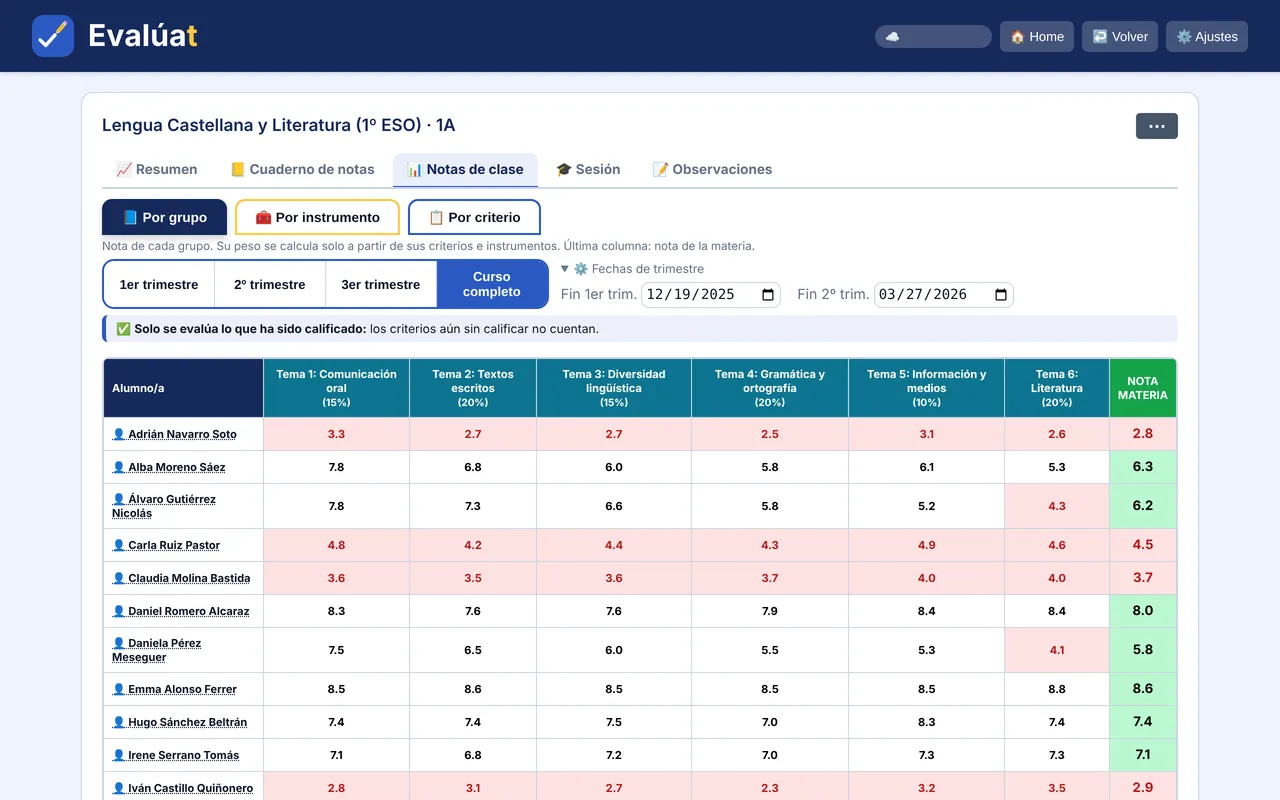
Screenshots of the sample class the app creates in one click. They are in Spanish; the app can be used in English.
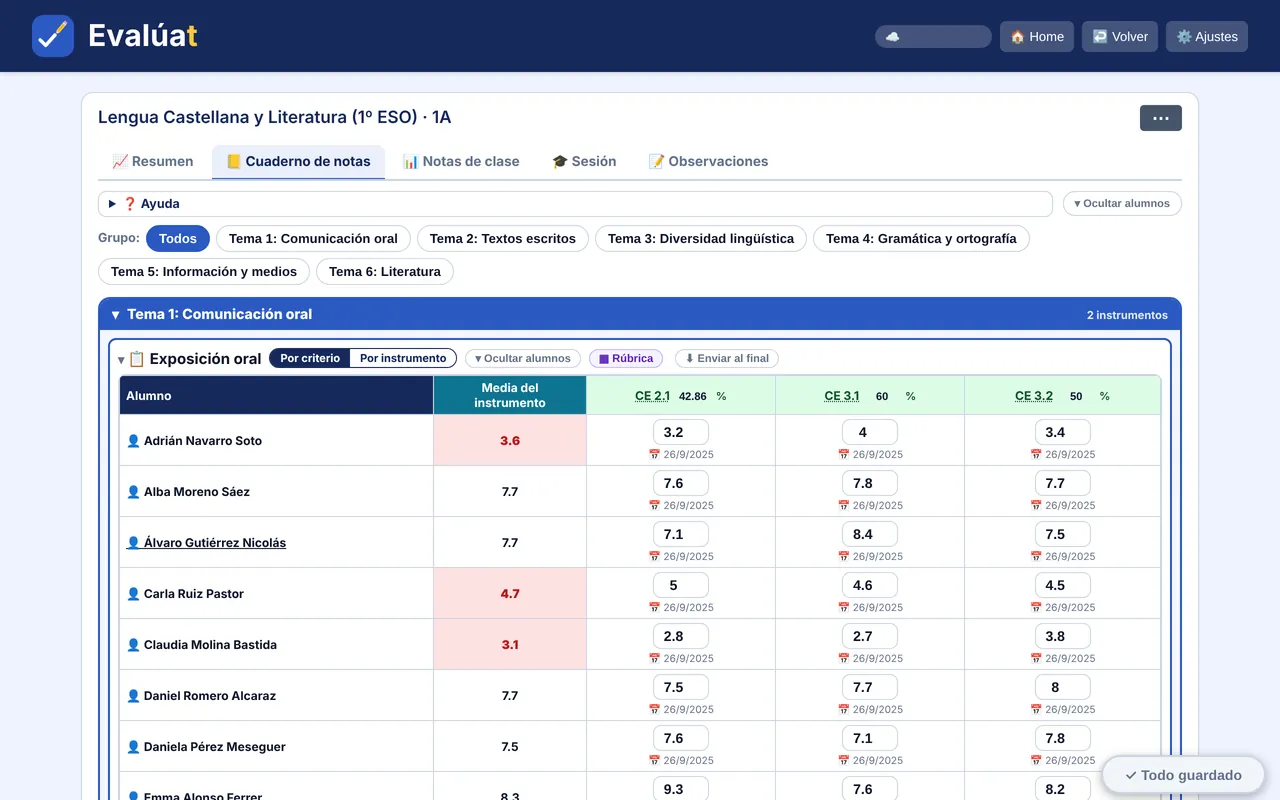
The grade bookYou grade each criterion in each assessment tool. 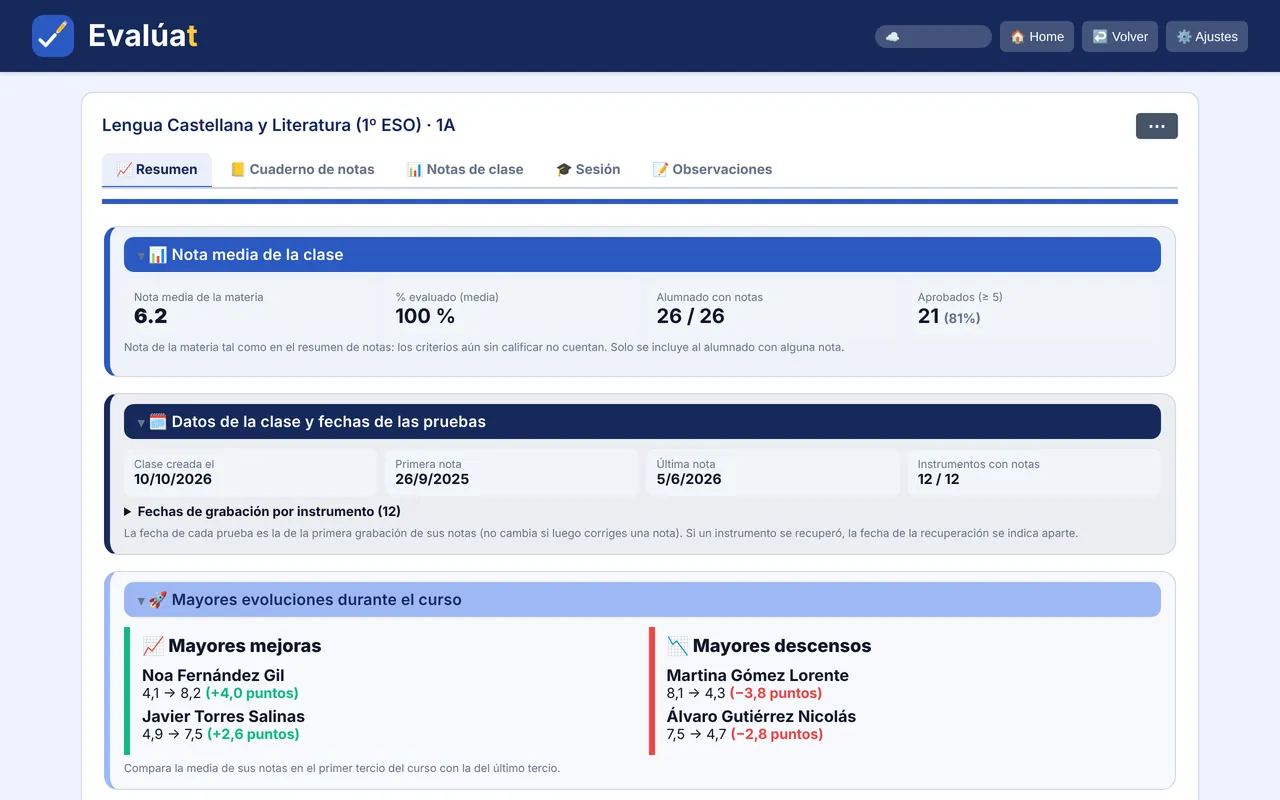
Class summaryAverages, pass rates, who is improving or slipping, and risk alerts. 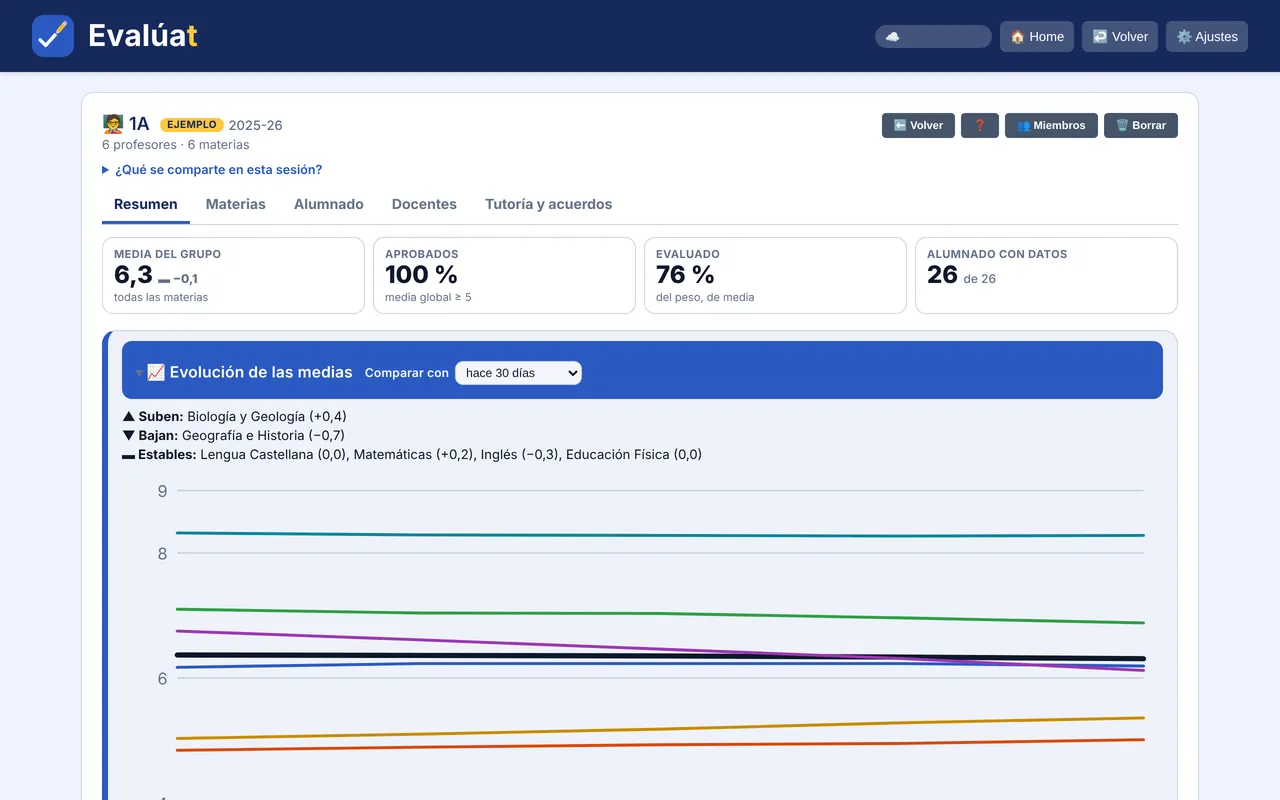
Assessment meetingAverages for every subject in the group.
Your teaching programme, built from your class
Evalúat creates a Word document with the programme's 11 sections from what's already in your grade book: units, assessment tools, criteria and weights.
- Assign the basic knowledge (or content, in VET) to each unit with one click.
- Your class's criteria and assessment tools go straight into the document.
- It comes out in Word, so you can review and adjust it before handing it in.
Currently available in the Region of Murcia: Primary, ESO, Bachillerato and Intermediate and Higher VET. The document is generated in Spanish.
What the programme includes (in Spanish) →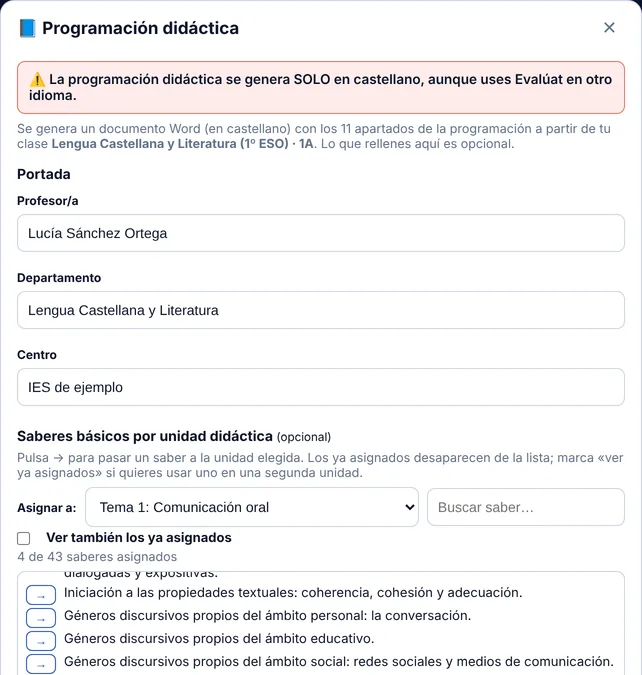
With your region's regulations
Every criterion comes from its regional decree or order. Pick your region to see what is included (pages in Spanish).
On your computer, tablet or phone
Evalúat runs in any browser: Windows, Mac, Chromebook, Android, iPhone and iPad. It installs like any other app and keeps working offline.
And your school's cover duties? Meet Aularium
Aularium organises staff absences and assigns cover duties the moment someone is off, with phone notifications and a screen for the staff room. It works with the same account as Evalúat.
See AulariumFrequently asked questions
What is Evalúat?
A teacher's grade book for LOMLOE criteria-based assessment. You choose the stage, year and subject, the evaluation criteria are already loaded and the app works out the grade for each criterion, competence and subject.
Which stages and regions does it cover?
Primary, ESO, Bachillerato and VET (Basic, Intermediate and Higher) in all 17 autonomous communities, plus Ceuta and Melilla. Each criterion shows the decree or order it comes from.
How is the grade calculated?
A criterion grade is the weighted average of the assessment tools you use for it, and the subject grade is the weighted average of its criteria. For example, a 6 in the exam (70%) and a 9 in activities (30%) give 6.9 for that criterion. Only what has been assessed counts.
Is my students' data safe?
Evalúat only stores students' names as personal data, alongside their grades and your notes. Names are encrypted on your device with a key only you hold: neither Evalúat nor the server can read them.
Do I need to install anything?
No. Evalúat runs in your browser. If you like, you can install it from the browser and have it as another app on your computer, tablet or phone.
Does it work offline?
Yes. You can enter grades offline and changes sync when you're back online.
Can I share grades with the teaching team?
Yes, with assessment meetings. You invite the group's teachers with a link or a QR code and each teacher shares only their subject averages, never individual marks or notes.
Does it create the teaching programme?
Yes: it creates a Word document with all 11 sections from your class. It is currently available in the Region of Murcia for Primary, ESO, Bachillerato and Intermediate and Higher VET, and is generated in Spanish.
What does being a founder mean?
You join the list of the first people who will use Evalúat. We'll let you know before anyone else, and you'll get whatever terms are reserved for founders. All we need is your email, and you can unsubscribe in one click.
Be one of the first to use Evalúat
Join the founders' list and we'll let you know before anyone else.
- You get in before anyone else.
- Your suggestions shape the next versions.
- Terms reserved for founders.